

PostgreSQL databases
Connection with pgAdmin
Connect to your Sliplane database with pgAdmin.
pgAdmin is the official open-source administration and management tool for PostgreSQL.
Deploy with the Sliplane preset:
Deploy pgAdminBefore you start
Open your Sliplane database to find its connection details.
Connect
-
Open pgAdmin and, in the left Browser panel, click Servers, then click Add New Server in the main panel.
-
On the General tab, enter a Name for the connection (for example, your database name).
-
Switch to the Connection tab and fill in:
- Host name/address — the host from the dashboard
- Port — the port from the dashboard
- Maintenance database — the database from the dashboard
- Username — the user from the dashboard
- Password — the password from the dashboard
-
Optionally enable Save password.
-
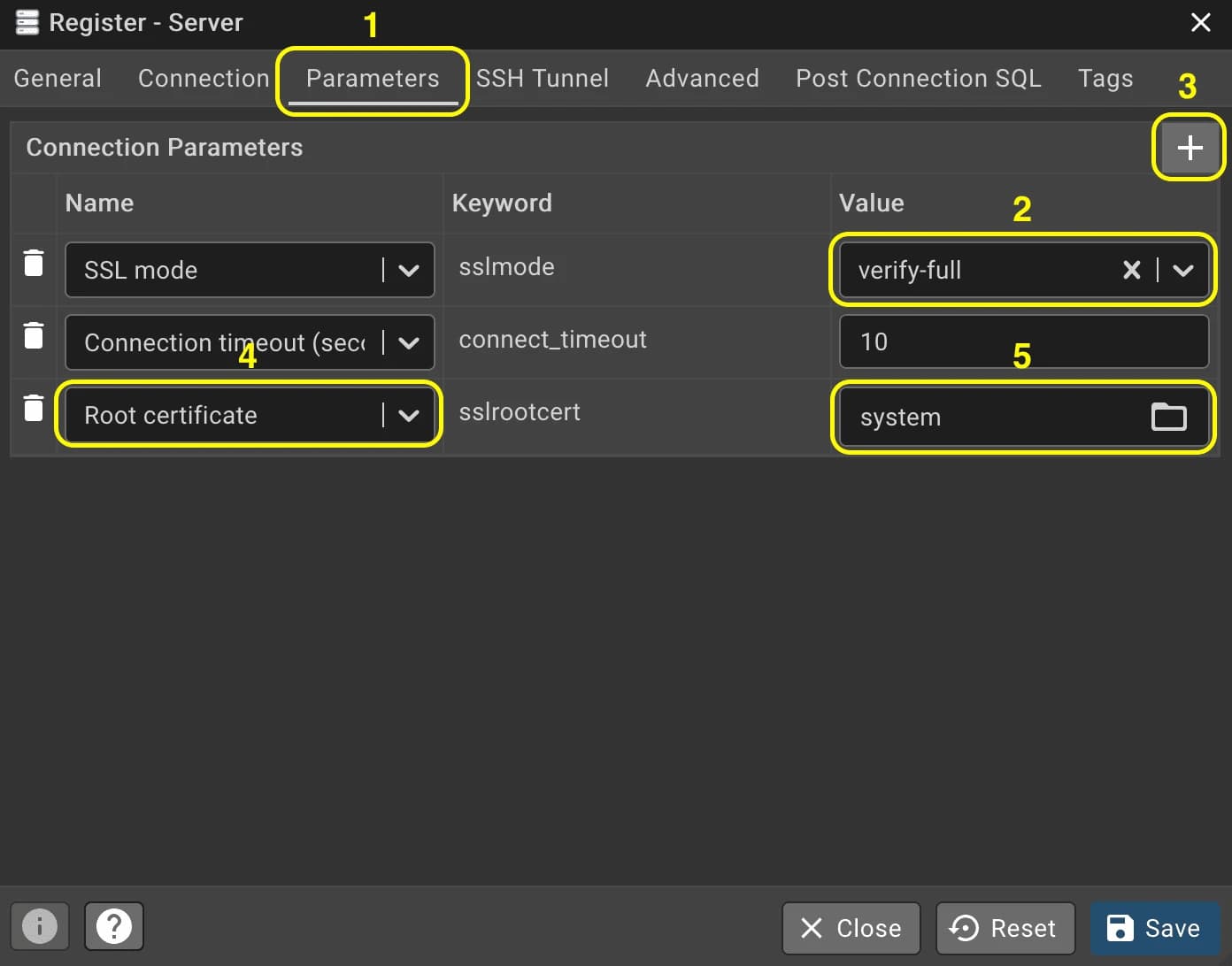
Switch to the Parameters tab, and:
- Set SSL mode to verify-full
- Add a new parameter Root Certificate (
sslrootcert) with valuesystem
-
Click Save. pgAdmin connects and shows your database in the Browser panel.
How is this guide?